
Mercedes-Benz C-Class (W205) 2015 - 2021 Owners Manual: ECO start/stop function
Operation of the ECO start/stop function Vehicles without a 48 V on-board electrical system (EQ Boost technology) Mercedes-AMG vehicles: observe the notes in the Supplement. Otherwise, you may fail to recognize dangers. The engine is switched off automatically in the following situations if all vehicle conditions for an automatic engine stop are met:
Vehicles with automatic transmission: If you switch on the HOLD function or select a transmission position other than R, the engine will automatically stop in the following situations:
The engine is restarted automatically if:
If the engine was switched off by the ECO start/ stop function and you leave the vehicle, a warning tone sounds and the engine is not restarted. The Vehicle Operational Switch the Ignition Off Before Exiting display message also appears in the multifunction display. If you do not switch off the ignition, the ignition is automatically switched off after three minutes. Vehicles with a 48 V on-board electrical system (EQ Boost technology) The engine is switched off automatically in the following situations if all vehicle conditions for an automatic engine stop are met:
If you switch on the HOLD function or select another transmission position R, the engine will automatically stop in the following situations:
The engine is restarted automatically if:
If the engine was switched off by the ECO start/ stop function and you leave the vehicle, a warning tone sounds and the engine is not restarted. The Vehicle Operational Switch the Ignition Off Before Exiting display message also appears in the multifunction display. If you do not switch off the ignition, the ignition is automatically switched off after three minutes. Deactivating or activating the ECO start/ stop function
Depending on the model and the vehicle equipment, the button may also be located at a different position in the center console. |
 or
or  is not
selected
is not
selected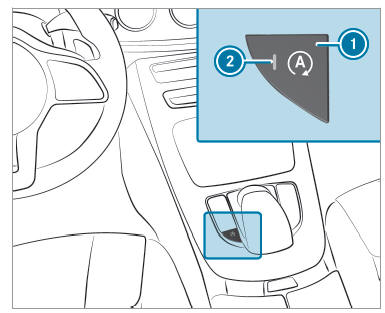


See More:
Mercedes-Benz C-Class (W205) 2015 - 2021 Owners Manual > Driving and parking: Driving and driving safety systems
Driving systems and your responsibility Your vehicle is equipped with driving systems which assist you in driving, parking and maneuvering the vehicle. The driving systems are aids and do not relieve you of your responsibility pertaining to road traffic law. Pay attention to the traffic conditions a ...
Mercedes-Benz C-Class (W205) 2015 - 2021 Owners Manual
- At a glance
- Digital Operator's Manual
- General notes
- Occupant safety
- Opening and closing
- Seats and stowing
- Light and visibility
- Climate control
- Driving and parking
- Instrument Display and on-board computer
- Voice Control System
- Multimedia system
- Maintenance and care
- Breakdown assistance
- Wheels and tires
- Technical data
- Display messages and warning/indicator lamps
Mercedes Benz C-Class (W204) 2007 - 2014 Training Manual
